How I Keep the AI Bill Down & the Output Sharp
Keeping the context low and the cache high.
People ask how I keep the AI bill down and the output sharp at the same time, like the two are pulling against each other. They mostly aren’t. One habit fixes both.
Cost of a prompt with loaded context
Picture the context window as a room, and every file you load in as another person talking. The model has to listen to all of them at once before it answers, so the one who actually knows the thing gets one voice out of two hundred. Chroma tested 18 frontier models on this last year and every one got worse as the input grew. Not at the end, when the window fills up. Gradually, the whole way along. And every extra token costs money, so the same habit handles both problems: I don’t try to use fewer tokens, I try to be picky about which tokens the model sees, every turn.
One caveat I’ll come back to at the end: that’s a benchmark measuring accuracy against input length. Whether the same slope shows up inside a long agent session is a separate question, and the answer is messier than I used to think.
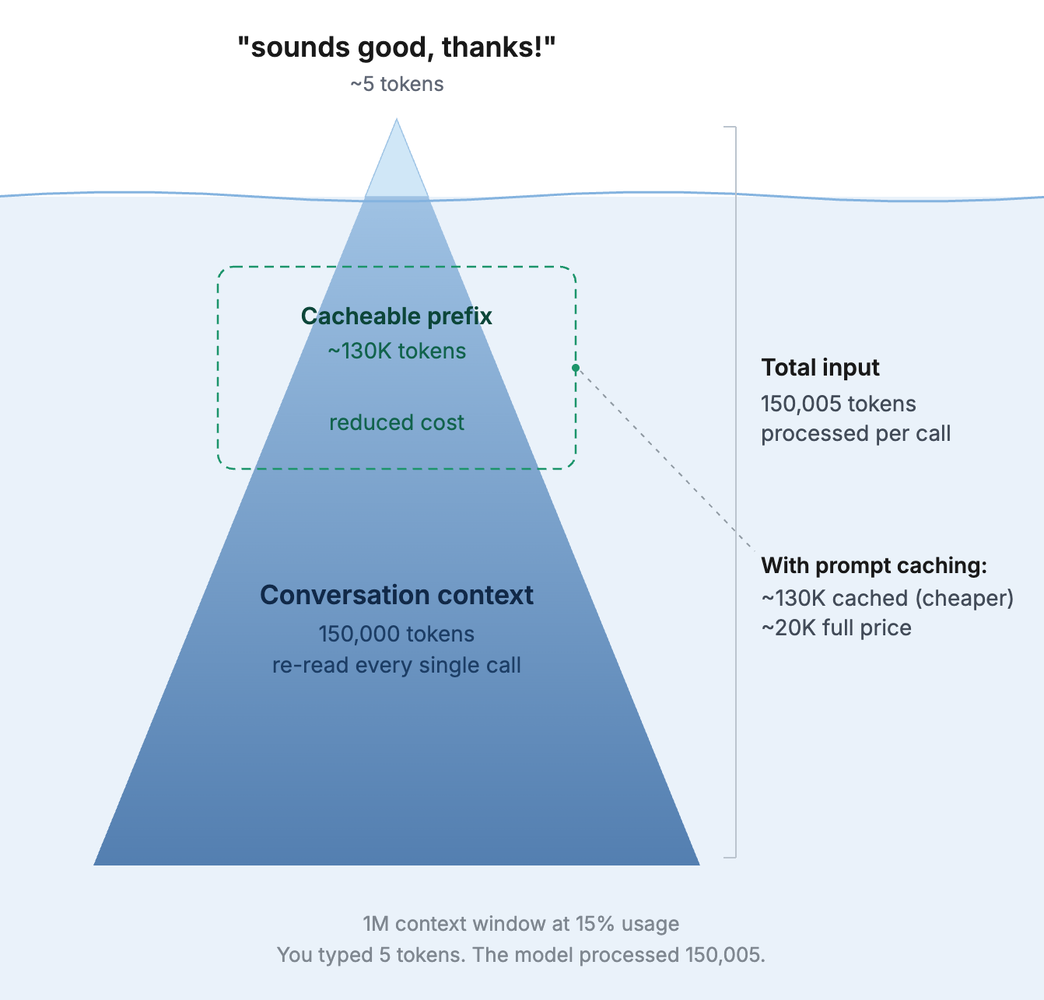
What changed for me was how I pictured the window. I used to treat it as a container I was filling, and now I treat it as the material the model works with. The wrong 100k tokens produce confident nonsense. The right 8k can produce something sharp on the first try, at 1/12th of the price.
What my statusline looks like

This is how I’ve configured my status line. Project folder, git branch, model, effort, estimated cost so far this session, cost of the current turn, and the session limits are on the left. Context window and cache on the right. Those two on the right do most of the work: how full the window is, and how much of it came back from cache instead of being paid for fresh. You can grab my statusline from this gist.
Everything below is about keeping the first number low and the second number high.
One thing worth knowing before the rest of it makes sense: the model can’t set anything aside. It has no pile for “read this later.” Whatever you load competes for attention on every single turn. And the worst filler isn’t random noise. It’s the stuff that looks relevant and isn’t: the adjacent code, the approach you abandoned, brainstorming leftovers, the three tries that didn’t work.
Load only the slice you need
I turn the requirements document into a structured JSON contract and keep it in the repo. It holds the actors, the entities they interact with, user journeys, business rules, constraints, and an open questions list for anything still undecided. I call it the intent model, and it has its own note.
A rule in the intent model looks like this:
{
  "rule": "unverified_users_can_draft_but_not_send",
  "applies_to": ["compose", "outbox"],
  "on_violation": "show_verify_prompt"
}
That’s one entry, and it covers a whole class of edge cases the model would otherwise have to guess at or go hunting for.
Why JSON instead of prose? Two reasons. Prose can be read two ways, and writing the contract as JSON forces me to pick one before the model ever sees it. The second reason is sneakier. Anthropic found the same thing building harnesses for long-running agents: a model is less likely to “helpfully” rewrite a JSON file than a markdown one, so the contract tends to survive the session.
On a real, large SaaS project this is never one file. One module per domain, a shared core, plus interaction patterns:
intent/
├─ shared.json        loaded every session
├─ auth.json
├─ compose.json
├─ calendar.json
└─ patterns.json      interaction patterns

# sign-up screen loads :  shared.json + auth.json + patterns.json
# it skips             :  compose.json, calendar.json
                          (rules that almost apply, but doesn't)
The skipped modules wouldn’t help if I included them. They’d sit in the room, talking, with rules that almost fit the screen being built.
Better still, let the model fetch its own slice. It can grep for the two files it needs. I don’t have to guess in advance and pre-load everything it might want.
Write the durable stuff down once
Here’s the rule I use to decide where something goes. If it’s true across sessions, it belongs in a file the session reads at startup. If it’s true only for this task, it stays in the chat.
The most wasteful tokens I ever spent were on explaining the project again every morning. All of that now lives in CLAUDE.md, since I work in Claude Code (other tools read AGENTS.md or their own equivalent):
CLAUDE.md      stack, conventions, structure, decisions behind them
PROGRESS.md    "where we are", one paragraph, pinned to the top
DECISIONS.md   one-liners, answers itself before it's asked
Instructions that only matter sometimes go into skill files that load on demand. The model reads the presentation instructions when it’s building a presentation, and never otherwise.
Lazar Jovanovic builds products with AI for a living, and on Lenny’s podcast he put a number on what skipping those files costs you. Without them, the model “is going to consume 80% of the token allocation on reading to get clarity, leaving only the final 20% for thinking and executing.” His files are PRDs and a tasks.md rather than JSON, and his agents read them before every prompt. Same bet either way: pay once, in a file, instead of every turn, in the chat.
Caching makes this cheaper than it looks

Cached input tokens cost about a tenth of fresh ones, and what gets cached is the stable front of your context, the part that doesn’t change between turns. So the files above pay for themselves. That CACHE reading in the status bar, 96% HIT, is the stable front being read back cheap.
Keep CLAUDE.md and the intent modules at the front, don’t churn them, and every turn after the first reads them at a heavy discount. Churn them and you break the cache, and the whole thing gets re-bought at full price.
Put rules in tooling, never in the conversation
A lot of what people re-explain every session is rules. Don’t hardcode colors. Every string goes through the translation layer. No raw fetch calls. I stopped explaining these. They’re ESLint errors now.
$ git commit
› running verify...

  ✖  raw hex color, use a design token          no-hardcoded-color
  ✖  untranslated string literal                i18n/no-raw-string
  ✖  direct fetch(), use the api client         no-raw-fetch

  3 errors. commit blocked.
A rule in the linter is context I never spend again, and it can’t get drowned out by whatever else is in the window. Schemas get verified against checked-in fixtures, and a verify script gates every commit, so most bad output is caught before I even read it.
Fiona Fung, who manages the Claude Code and Cowork teams at Anthropic, calls verification the new bottleneck. Engineers there ship about eight times the code they did a year ago, and no human reads their way through that volume. The tooling has to make the first pass.
Michael Truell of Cursor advises against telling the model everything in one go. “Chop things up into bits,” be specific about each, review as you go. Good prompting advice. Rules are the one thing I’d push a step further, because a rule that can be a lint error doesn’t need to be prompted at all, in bits or otherwise.
Push the record to disk
Long sessions degrade, and not because the model gets tired. The window slowly fills with the history of the work: dead ends, failed iterations, reference files, screenshots, tool calls. None of it helps the next turn, and all of it gets weighed on the next turn.
So I write memory to disk as I go. Commit often. A post-commit hook drops a stub for each meaningful commit, and those drain into a dated build log. Open questions go into open_questions[] in my intent model instead of riding along in the chat. Once something is written down somewhere I can find it, I let it leave the window.
Related: check what loads before you even send a prompt. Every connected MCP server puts its full tool schema into the window at startup, whether you use it or not. I switch off the ones this project doesn’t need. I’m not smart enough to tinker with the system prompt and the built-in tools, and those are mostly what makes Claude Code behave like Claude Code, so I leave that alone.
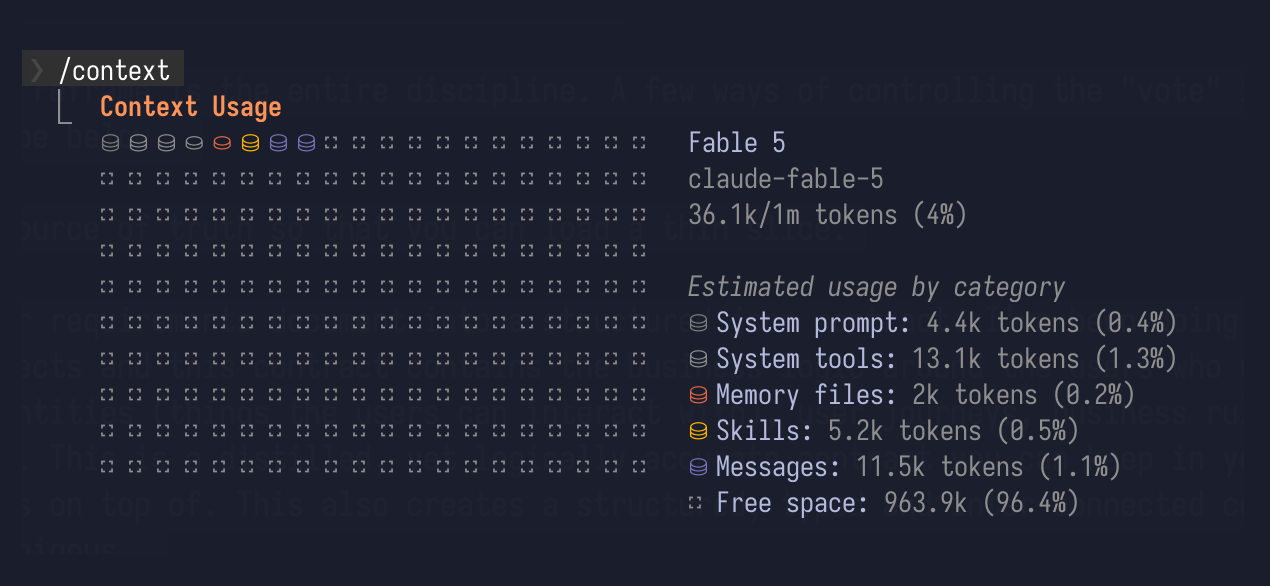
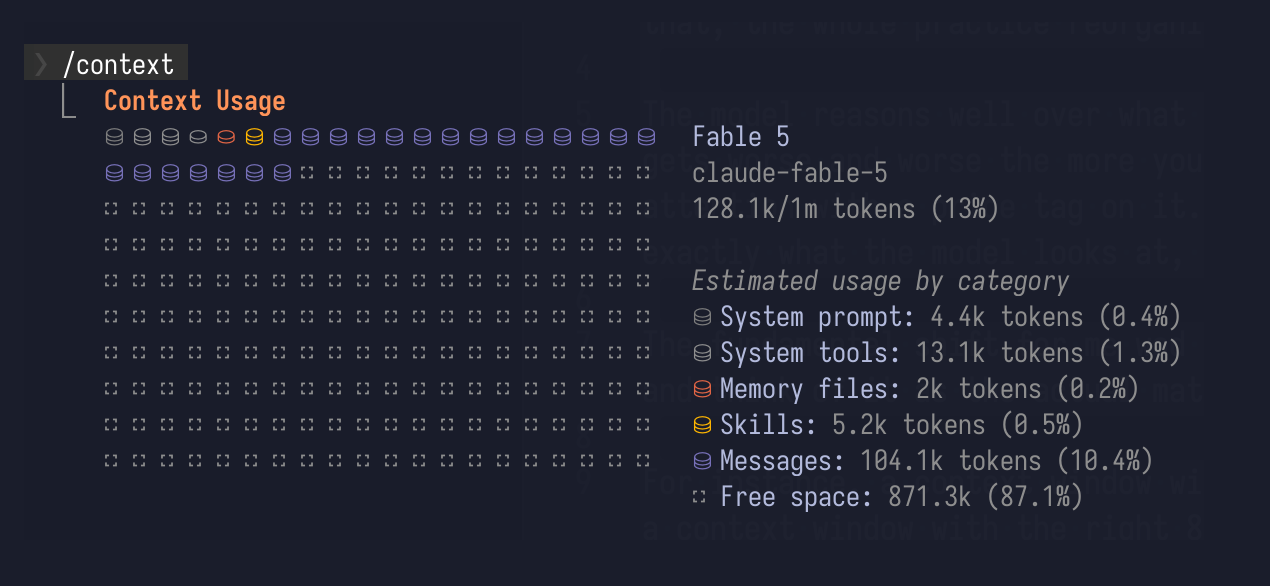
I have around 30 tools connected and zero tokens spent on them until something actually calls one. That’s the whole game, really. Nothing gets to sit in the window without a purpose.
Checkpoint before the window sags
My rule: when the window hits about 30% and the work isn’t finished, stop.
CONTX  ▓▓▓▓▓▓░░░░░░░░░░░░░░  30% full
             ↑
       around here is the line. update PROGRESS.md, verify,
       commit a clean WIP, then reset.
Why 30%? Because a reset is nearly free and a bloated window is expensive. And wrapping up costs context too: the notes, the verification, the commit. Start that when the window is already cramped and the checkpoint itself comes out sloppy. 30% is conservative on purpose. I’d rather cut early. You could cut at 20%, depending on the project and what you’re doing.
I used to do the opposite. I’d spent all those tokens loading context, so surely the smart move was to keep going and get my money’s worth, right? Nope, it wasn’t. A degraded window compounds. Every turn re-reads the whole bloated history and reasons over it a little worse, right at the point where I’m most tempted to push for one more thing. Caching softens the bill for the re-reads. It does nothing about the bloat underneath.
Degrading and filling are two different problems, though, and I’d been treating them as one. A study of coding harnesses pulled them apart. The setup is clean: fix the agent loop, vary only how context is handled, run four models over SWE-Bench Verified and Terminal-Bench.
Managing the context was worth 35.7 points of success rate at a 32k window, and 2.7 points at 128k. What tracks that drop is the overflow rate. Unmanaged runs died from a full window 78.7% of the time at 32k, and 8.7% of the time at 128k. Nearly all of the win was avoiding the cliff, not sharpening the turns before it.
So the slope is thinner than I made it sound. Fuller context didn’t visibly make their agents reason worse along the way. It made them run out of room. Two caveats before I throw out my own paragraph: they tested Nemotron and Mistral, not the models I actually use, and a benchmark task finishes in under an hour while my sessions run for days.
The habit survives either way, and I’d rather it survived for the right reason. Checkpoint at 30% and you never get near the cliff, which is the part that’s measured. The sag I think I feel on the way there is a bonus if it’s real.
There’s a middle path called compaction, where the session summarizes itself and carries on. I mostly skip it. A summary written by a degraded session inherits the confusions of that session, and PROGRESS.md is curated by me. The reset and restart takes 30 seconds. Incomplete-but-rigorous beats complete-but-sloppy, and it costs way less.
That same study makes the best case against me here. Their most efficient strategy was staged: drop stale tool output for cheap stubs at 60% full, then pay for an LLM summary at 85%. Cheap deletion first, expensive summarizing only when it’s earned. I have no counter to that except the one thing they didn’t test, which is a human writing the summary.
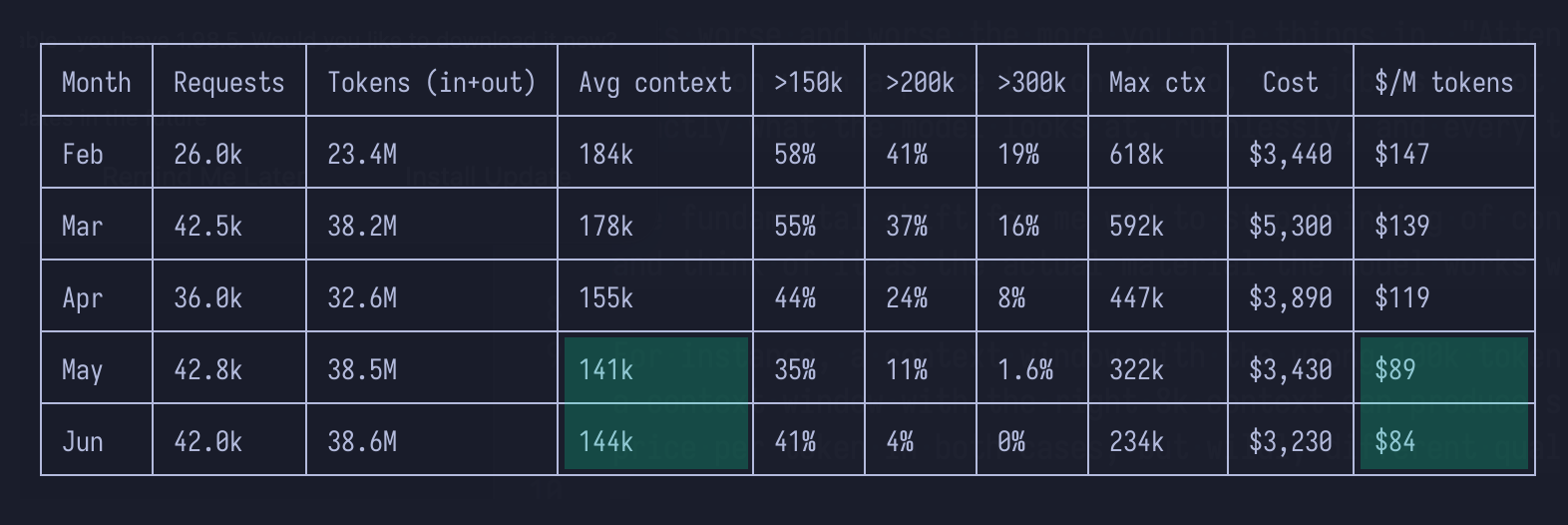
I asked Claude to analyze my sessions from this year, and cutting early turned out to cost less per unit of work done.
Give the grunt work to cheaper models
Not every task needs the expensive model. I do the thinking on the big one and hand the mechanical edits to cheaper sub-agents, each with its own slice of context and the exact change it owns. Separate contexts, run in parallel, and a worker that only sees its slice can’t get distracted by anyone else’s.
Exploration gets the same treatment. Finding the right slice can fill a window all by itself: the greps, the dead-end reads, the six files opened to find the one that mattered. A search agent does all of that in its own disposable context, and only the conclusion comes back to the main model. Both of these are wired up as slash commands and skills.
Two notes for design and front-end folks
Screenshots are some of the most expensive tokens we spend, and we spend them without thinking. Before pasting an image, I check whether a written spec would do the job. “8pt grid, 390 by 844, these tokens, this spacing scale” carries most of what a mockup carries, at a fraction of the weight. I save images for genuinely visual problems: a rendering bug, a layout that reads wrong, a before-and-after.
And a component registry turns out to be a context tool whether or not you built it as one. When the model composes a screen, it loads the registry index (names, props, usage rules) instead of a dozen component source files. Same trick the intent model pulls on the requirements, applied to the codebase.
What I haven’t solved
The intent model is starting to grow the problem it was built to fix. The shared core gets a little bigger with every domain, and every session loads it. At some point I’ll need to slice the slice, and I don’t have a clean rule for when.
The obvious move is to split it: a shared-lite that loads by default, a shared-full that loads only when a task spans domains. I’ve tried it. The trouble is deciding what’s lite, and that decision keeps moving. A rule that felt peripheral last month is load-bearing this week, and the session that needed it had no way of knowing to ask for the full core. So the split just moves the guessing I was trying to get rid of, from “which modules” to “which tier”. If you’ve solved this, I want to hear it.
Not day-one advice
None of this is where I’d tell someone to start. These rules came from a year of watching where the money and the quality actually went, and every one is a fix for a problem I’d already felt. Build the whole system before you’ve felt those problems and you’ll optimise for the wrong thing. Worse, you’ll tune the context so tightly that the loose, wasteful exploration that shows you what good even looks like never gets to happen. Boris Cherny, who runs Claude Code, is blunt about this: Anthropic hands its engineers near-unlimited tokens, and the cost of an idea gets optimised only after the idea works. Make a mess first. Each habit here is worth more once you know which problem of yours it’s solving.
The short version
- Load a thin slice
- Keep the rules in tooling
- Write the record to disk as you go
- Checkpoint while there’s still room, then reset
- Give the search and the grunt work to cheaper models
- Keep the reasoning in one place (frontier model)
After a while you can feel the window filling up the way you feel a paragraph running long. A sense that it’s time to cut, checkpoint, and come back clean.